
Supermom
Appinion BD LimitedParenting
4.15.00 Reviews
- Version
- 1.0.9
- Installs
- 100.00K
- Age Rating
- Everyone
Screenshots
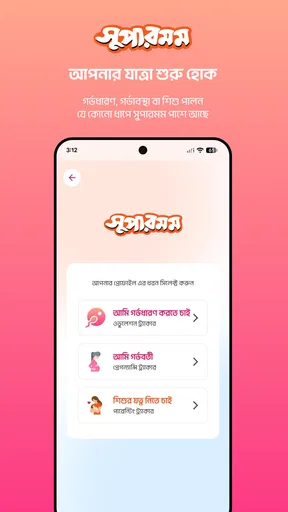
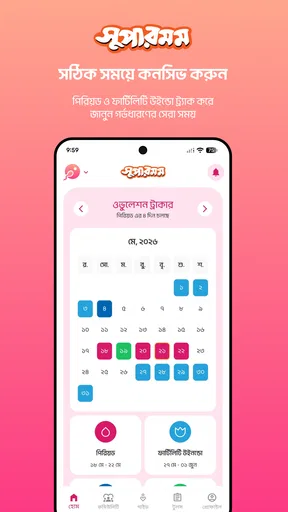
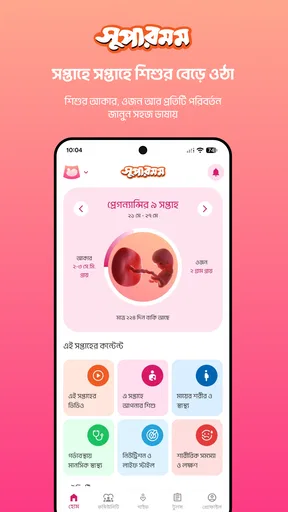

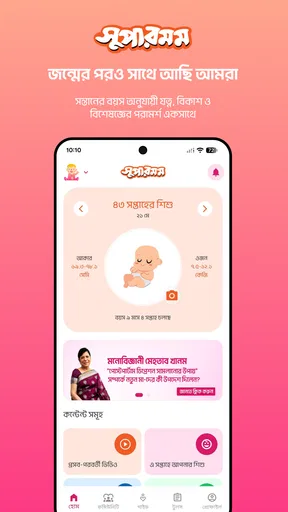

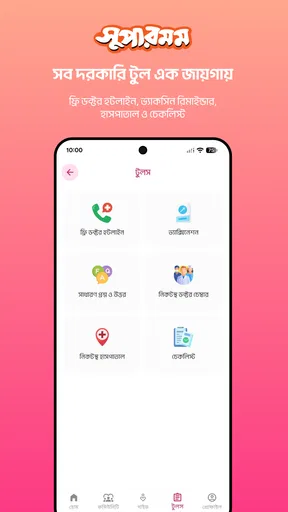

Our Review of Supermom
 Analysis by Appyee
Motherhood rarely follows a neat schedule, so an app that aims to help has to fit around interruptions rather than demand perfect attention. After spending time with Supermom, I found its main appeal in that supportive positioning: it is a free parenting app from Appinion BD Limited, designed for people who want a digital companion during the everyday stages of motherhood. My experience was less about treating it as an authority and more about seeing whether it could become a practical touchpoint during busy, connected moments.
The app has a 4.1 average from around 700 ratings and has passed 100 thousand installs, which suggests that it has attracted a meaningful early audience. It is suitable for Everyone, runs on devices using Android 8.0 or later, and the current release is version 1.0.9. Those details make it approachable for families using older phones, although the real question is whether its connected experience fits the way you already manage parenting information.
How Supermom fits into connected motherhood
I look at Supermom as one possible starting point when I want to keep parenting questions and support within a motherhood-focused app rather than scatter them across searches and group chats. In this section, I’ll consider how that connected starting point can fit into a real day, including the moments when a quick check is useful and the handoffs that still belong with family members or professionals.
Useful when a short online check is realistic
The strongest way to think about this app is as a companion for brief, intentional visits. A parent may open it while waiting for an appointment, during a quiet feeding break, or after remembering a question late in the evening. In those situations, a focused parenting app feels more comfortable than searching the wider internet, where results can be contradictory, alarming, or difficult to judge.
That convenience depends on connectivity. A connected app can feel reassuring when it responds at the exact moment a parent is looking for guidance or encouragement, but that same benefit becomes less dependable in places with weak reception. I would therefore treat Supermom as something to consult when the phone is online, not as the only place to keep information needed in an urgent situation.
This distinction matters because parenting questions are not all equal. Looking for ideas to make a routine calmer is a good match for a supportive app experience. A sudden medical concern, a serious symptom, or a safety decision calls for a qualified professional or emergency service instead. Supermom can sit alongside those resources, but it should not replace them.
The mobile setting changes how helpful it feels
On a phone, the value of any parenting app is closely tied to how much concentration it asks from me. Parents often use one hand, stop halfway through a screen, and return later after a child needs attention. That makes short, readable sections more useful than long explanations that require uninterrupted focus. I found the best approach was to open the app with one question in mind rather than browse without a purpose.
A realistic example is a parent standing outside school pickup with a few minutes to spare. Instead of opening several browser tabs, comparing search results, and trying to remember which advice came from a trustworthy source, the parent can use Supermom as a single starting point for a calmer check-in. If the connection is stable, this kind of small interaction can reduce friction during a crowded day.
The trade-off is that phone-based convenience can encourage hurried reading. Parenting advice often needs context: the child’s age, the family’s routine, and the seriousness of the situation all change how useful a suggestion may be. I would avoid acting on a headline or a quick impression. Read enough to understand the point, then decide whether it actually applies to your household.
What makes the app more useful than a general search
General web searches offer breadth, but they also place the work of filtering on the parent. Supermom’s parenting focus gives the experience a narrower purpose. That can be helpful when I want to stay within a family-oriented environment instead of jumping between unrelated pages, advertisements, forums, and conflicting opinions.
At the same time, a specialized app is not automatically more complete than the web. If I need a very specific local service, a detailed clinical explanation, or official guidance, a search engine or a trusted institution may be better. My practical rule is to use this app for orientation and everyday support, then move to a more authoritative source when the decision has health, safety, or legal consequences.
One non-obvious advantage of this approach is emotional pacing. Searching broadly while tired can turn a small concern into an anxious research session. Starting with a parenting-focused app may help me frame the question more calmly. The limitation is that reassurance can become misleading if I mistake a comforting tone for a complete answer, so I still need to check the seriousness of the issue independently.
What happens when the connection is unreliable
Connectivity is not just a technical detail here; it shapes when the app is available as a useful companion. In a strong network area, opening a parenting resource at the right moment feels natural. In a lift, a rural route, a crowded venue, or a room with poor reception, the experience may be interrupted or delayed. I would not plan an important decision around being able to access it at all times.
That is why I recommend a simple preparation habit: before leaving home, review any information you expect to need and keep essential phone numbers or professional advice somewhere dependable. This is not a criticism unique to Supermom. It is a sensible boundary for any connected parenting tool. The app can support preparation, but preparation should not depend entirely on a live connection.
When the app does not load smoothly, repeatedly tapping the screen is rarely the best response. I would first check whether other online services are working, then try again after moving to a better signal. If the issue continues, switching temporarily to a saved note, a trusted book, or a professional contact is more useful than losing time fighting the interface.
Recovering without losing the thread
Parents often use apps in fragments. A child cries, a delivery arrives, or a routine suddenly changes, and the phone goes down before the information has been absorbed. My advice is to use a small personal workflow: decide what you were trying to learn, note the key question in a phone note, and return to Supermom when you have a stable connection and a clearer minute.
This method prevents a common mistake: reopening the app later and browsing aimlessly because the original reason for opening it has been forgotten. It also makes the app less dependent on perfect memory. A brief note such as “bedtime resistance—look for routine ideas” is enough to restore context without turning parenting into a paperwork exercise.
If a session is interrupted, I would not assume that the app has preserved every part of what I was reading. Instead, I would reopen the relevant area and confirm the information again. That cautious habit is worthwhile with any mobile app, especially when the phone has changed networks or been left idle for a while.
Using mobile data thoughtfully
Because the experience is built around connected use, data-conscious habits are sensible. I prefer to use a home or trusted Wi-Fi connection for longer browsing and reserve mobile data for short checks when I genuinely need them. This is particularly practical for parents who share a limited data plan or use a phone that is also responsible for calls, school messages, and navigation.
I also avoid leaving any app open while doing other tasks. Closing it when I am finished keeps my routine clearer and reduces the chance of accidentally returning to a page later without remembering why. The goal is not to make Supermom difficult to use; it is to make its role deliberate. A parenting app works best when it answers a need rather than becoming another endless feed to monitor.
Another useful habit is to separate information gathering from decision-making. I might read a relevant item while connected, then put the phone away and discuss the practical next step with my partner or family member. This is especially helpful when advice affects the whole household. The app becomes a prompt for conversation instead of a private authority that one person follows without context.
Who will get the most from it
I think Supermom is best suited to mothers who want a dedicated parenting space for everyday support and who are comfortable checking an app from a phone. It may also suit someone beginning to organize her digital parenting resources and looking for a single place to start rather than a collection of unrelated websites.
Its Everyone age rating makes it broadly approachable from a store perspective, but that should not be confused with every piece of parenting content being equally appropriate for every family situation. Parents still need to judge advice according to their child’s age, development, health, and circumstances.
The app is less likely to satisfy someone who wants a fully professional medical reference, a private family organizer, or a replacement for direct conversation with a doctor, midwife, therapist, or local support service. It is also not my first choice for a parent who regularly spends time without reliable internet and needs guaranteed access in those moments.
How it compares with familiar alternatives
Compared with a general browser, Supermom offers a more focused starting point. The browser wins when I need broad research, official documents, or local information, while the app is more appealing when I want parenting-oriented guidance without sorting through a large search page.
Compared with messaging a parenting group, the app can feel more private and less socially demanding. Groups may provide personal experiences and quick replies, but they can also produce conflicting opinions and pressure to follow the loudest voice. Supermom’s more structured setting is preferable when I want to think before asking other people. On the other hand, a trusted group can be better when emotional support or a local recommendation is the real need.
Compared with a notebook, the app is easier to consult while moving around and may feel more connected to an ongoing digital routine. A notebook wins for reliability, simplicity, and independence from reception. I would use both: the app for discovery and prompts, and a personal note for questions, reminders, or essential information I need to keep close.
Small habits that improve the experience
Open the app with one concrete question instead of browsing when tired or worried.
Use a stable Wi-Fi connection for longer sessions and keep mobile-data checks brief.
Write down the question before leaving the app if an interruption is likely.
Separate general support from medical or safety decisions that require a qualified source.
Keep a dependable offline note for urgent contacts and information you cannot risk losing.
These habits reveal the main trade-off clearly. Supermom can reduce the effort involved in finding parenting-oriented support, but it still asks me to manage the surrounding context: connection quality, attention span, and the difference between general guidance and professional care. Used thoughtfully, that is a reasonable exchange.
My connectivity verdict
My overall impression is positive but measured. Supermom is a free parenting app with a clear everyday purpose, and its 4.1 average indicates that many users find value in it. The work of Appinion BD Limited is most convincing when the app acts as a calm, accessible starting point during an online break in a busy day.
I would recommend trying it if you want a motherhood-focused companion and usually have dependable mobile or Wi-Fi access. I would not make it the sole resource for urgent questions, nor would I choose it over a professional service when the stakes are high. Parents who spend much of their time offline should also keep a backup routine.
In the end, the app’s usefulness is shaped as much by connectivity habits as by its parenting focus. When I use it intentionally, prepare for interruptions, and verify important decisions elsewhere, it fits naturally into mobile family life. My recommendation is to treat Supermom as a supportive first stop, not the final word.
Verdict
Strengths of Supermom
- Helpful pregnancy and parenting guidance tailored to each stage.
- Includes tools for tracking milestones, symptoms, and important dates.
- Large community for sharing experiences and receiving peer support.
- Covers fertility, pregnancy, baby care, and family-related topics.
- Personalized content makes daily information easier to follow.
Limitations of Supermom
- Some useful features may require a subscription or in-app purchases.
- Content quality can vary because some advice comes from community members.
- Frequent notifications may feel overwhelming for some users.
- Personalized recommendations require sharing sensitive health information.
- The app may not replace advice from qualified medical professionals.
Similar Picks in This Category
View All
Family Space
Motorola Mobility LLC.3.9

شرطة الأطفال - مكالمة وهمية
Oub Apps4.1

Findmykids: Parental Control
LETEM LTD4.6

Pregnancy + | Tracker App
Philips Electronics UK Limited4.8

Policía de niños - para padres
Kids police4.7

Pregnancy App
Amila4.9
Frequently Asked Questions
What is Supermom, and who is it designed for?
Supermom is a parenting and family-support app designed to help mothers and caregivers organize everyday responsibilities, discover useful parenting information, and connect with a wider community. Depending on the version and region, it may include articles, discussions, activities, recommendations, and family-related tools. It is mainly intended for parents who want practical resources in one convenient mobile application.
Is Supermom free to download and use?
Supermom can generally be downloaded without an upfront charge, but the available features may vary depending on the country, platform, and current app version. Some content or services may be free, while selected features, promotions, memberships, or partner offers could involve additional conditions or payment. Before using a premium service, review the in-app pricing, subscription terms, and cancellation policy carefully.
What kind of content and features can I find in Supermom?
The app typically focuses on parenting-related content and family assistance, such as tips, articles, community conversations, recommendations, and practical information for different stages of family life. Some versions may also provide shopping benefits, activities, expert advice, or personalized resources. Because features can change over time and differ by location, check the current app description and menus after installation.
Does Supermom require an account, and what personal information is collected?
Certain Supermom features may be available immediately, while participation in communities, saving content, receiving personalized recommendations, or accessing offers may require registration. Account creation can involve information such as an email address, profile details, location, or parenting preferences. Before signing up, read the app’s privacy policy to understand how information is collected, used, shared, and managed.
Is Supermom suitable for medical or emergency parenting advice?
Supermom can be a useful source of general parenting ideas, experiences, and educational information, but it should not replace a qualified doctor, pediatrician, mental-health professional, or emergency service. Advice shared by users or published in the app may not apply to every child or family. For urgent symptoms, safety concerns, or medical decisions, contact an appropriate professional directly.
